Why SpeakerDesk

Everything around the stage, in one place.

Most events stitch together a community site for RSVPs, a ticketing tool, a call for papers service, spreadsheets for sponsors and email for the rest, and pay for several of them. SpeakerDesk is one desk for organizers, speakers, sponsors and attendees, and it's free.

Get started

The usual patchwork

Good tools, each covering one part of the event

Every one of them does its own job well. The trouble is everything between them: copying speakers from one to another, sponsors in a spreadsheet, and attendees who never hear from you again.

Community and RSVP sites

Great at: Members, one-tap RSVPs and notifications when something new is posted.

Stops: At the call for papers, reviewing proposals, a programme across rooms, and sponsors.
Ticketing sites

Great at: Selling tickets, collecting payments and checking people in.

Stops: At speakers and their sessions, reviews, and what sponsors need to deliver.

Call for papers tools

Great at: Collecting proposals and reviewing them as a team.

Stops: At attendees, tickets, sponsors and the day itself.

Spreadsheets and email

Great at: Anything, at the start.

Stops: At the third co-organizer, the second edition, and keeping personal data safe.

Side by side

What each kind of platform usually covers

Typical coverage by type of platform
FeatureSpeakerDeskCommunity and RSVP sitesTicketing sitesCall for papers tools
Price for organizersFreeUsually paidOften paidOften paid
Call for papers with team reviews and anonymous reviewIncludedRarelyRarelyIncluded
Speaker profiles, a reusable session library and invitationsIncludedRarelyRarelyOften
Programme and a schedule across rooms and daysIncludedSometimesSometimesOften
Free tickets with QR codes and check-in at the doorIncludedOftenIncludedRarely
Attendees build their own schedule, without an accountIncludedRarelySometimesSometimes
Sponsor packages, deals, deliverables and booth scanningIncludedRarelySometimesRarely
Followers hear about new events and calls for papersIncludedIncludedSometimesRarely
Verified organizers and verified sponsor companiesIncludedSometimesSometimesRarely
One account to organize, speak and sponsorIncludedRarelyRarelyRarely
Attendee details encrypted and deleted 30 days after the eventIncludedRarelyRarelyRarely

Typical coverage by type of platform. Individual products differ, and many do their part very well. SpeakerDesk doesn't sell paid tickets: link to a ticketing site when you need payments.

Usually paid, free here

What you'd often pay for elsewhere costs nothing on SpeakerDesk

Events run on volunteer time and tight budgets. Spend the money on the venue and the speakers, not on software seats.

  • Running a group or publishing eventsElsewhere: A monthly subscription for the organizer, often per group.Free: Communities, events and followers
  • The call for papersElsewhere: A fee per event, or per extra reviewer on the team.Free: Calls for papers, team and anonymous reviews, decision emails
  • Free ticketsElsewhere: A per-ticket fee or a paid plan, even when the ticket itself costs nothing.Free: Free tickets with QR codes, emails and the attendee's own schedule
  • Check-in and badgesElsewhere: A separate check-in app or a badge printing add-on.Free: Door check-in on any phone and printable name badges
  • Sponsor lead scanningElsewhere: A charge per scanning device or per booth.Free: Booth scanning for every sponsor package that includes it
  • Analytics and exportsElsewhere: Reserved for higher plans.Free: Event analytics, CSV exports and sponsor dashboards
  • API accessElsewhere: Only on business or enterprise plans.Free: An API with personal tokens for organizers, speakers and sponsors
  • A bigger teamElsewhere: A fee per extra organizer or admin seat.Free: Co-organizers, reviewers and volunteers with their own roles

What other platforms charge differs per product and plan; this is what organizers commonly run into. Every feature on this page is free on SpeakerDesk today, for organizers, speakers, sponsors and attendees. SpeakerDesk doesn't take payments, so there are no ticket fees either.

Organizers
From call for papers to closing drinks, one workspace

  • Publish a call for papers, review with your team (anonymously if you like), decide and email every speaker in one go.
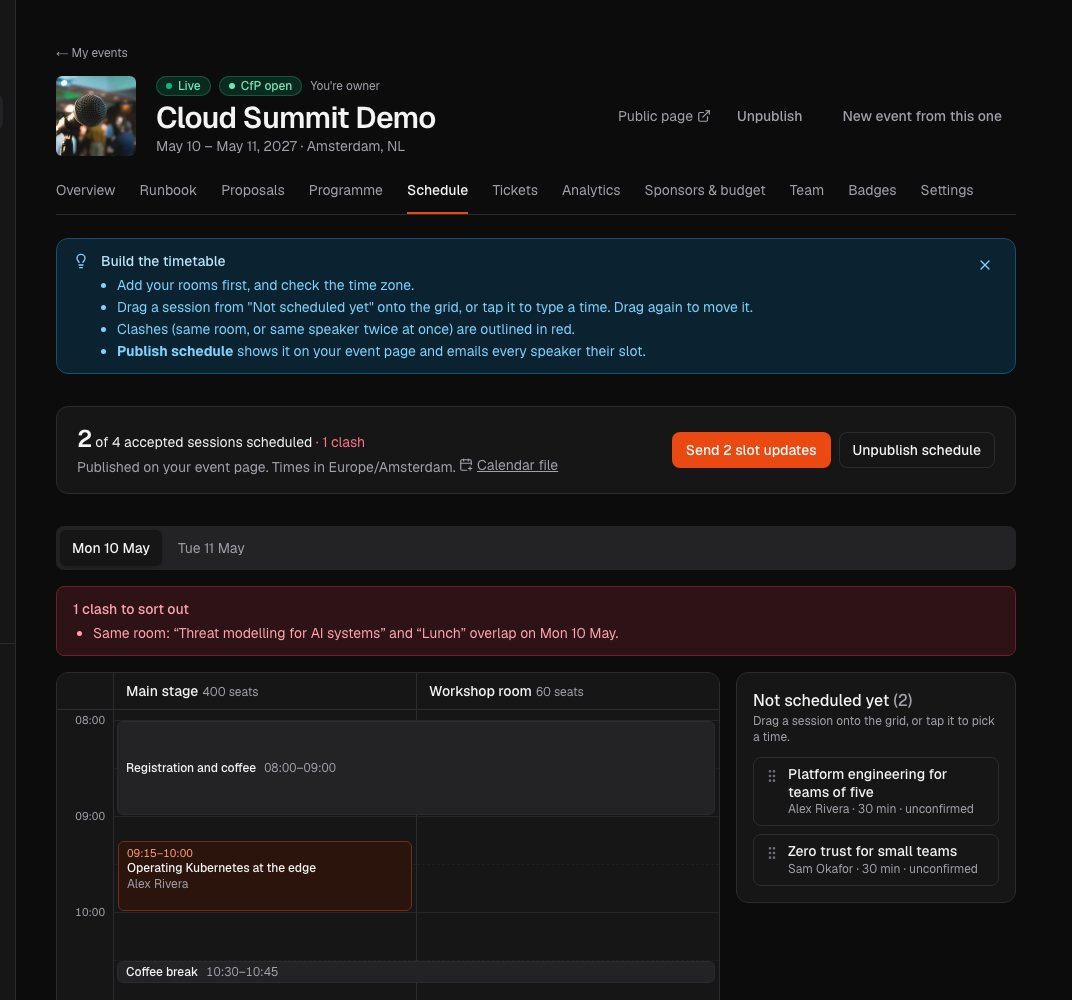
  • Drag accepted sessions into rooms and time slots. Speakers get their slot by email, and again if it moves.
  • Tickets, door check-in on a phone, printed badges, a runbook with owners, and analytics that size your rooms.
The schedule builder: sessions placed in rooms and time slots

Speakers

Write a session once, submit it everywhere

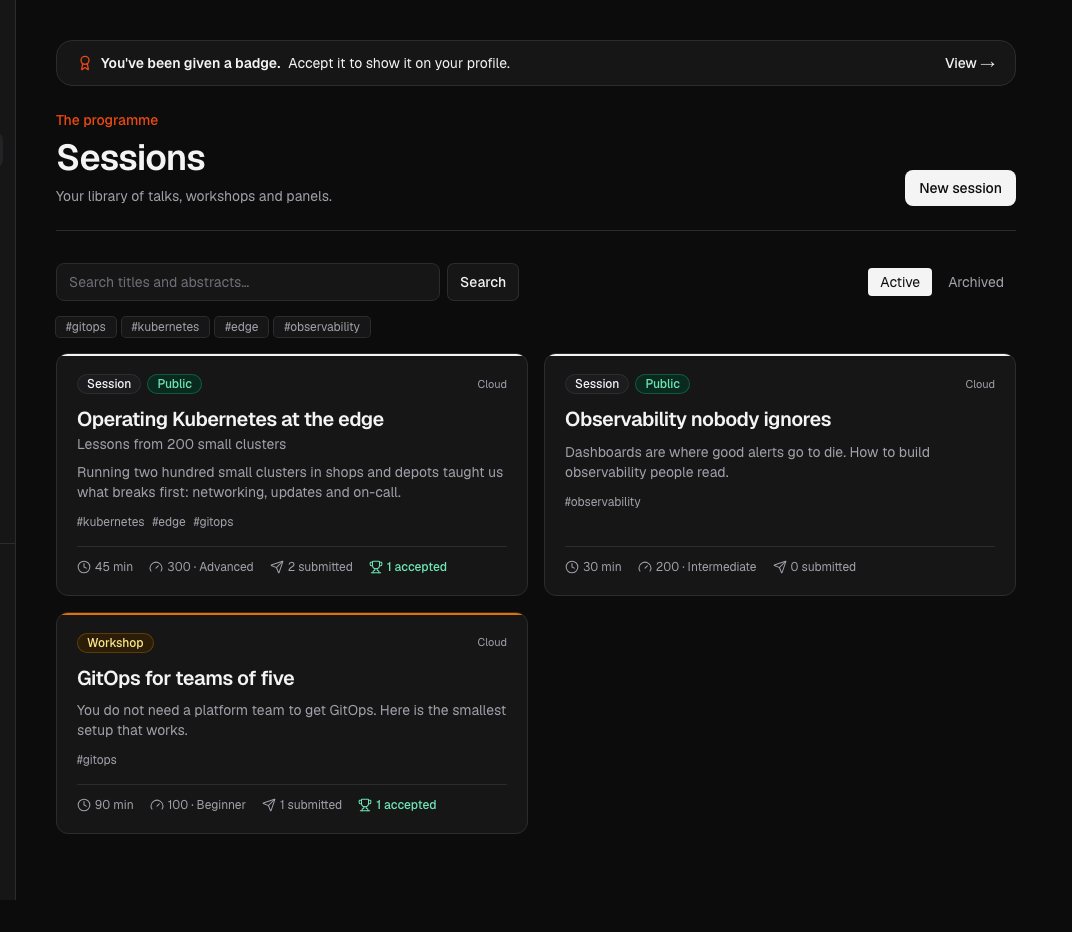
  • Keep bios, headshots and sessions in one library, and submit to any call for papers on SpeakerDesk in a few clicks.
  • Track every submission, also on other sites, with deadlines and decisions in one list.
  • Get an email when a call for papers opens on your topics, and a public speaker page organizers can invite you from.
A speaker's session library

Sponsors

Sponsorship you can measure

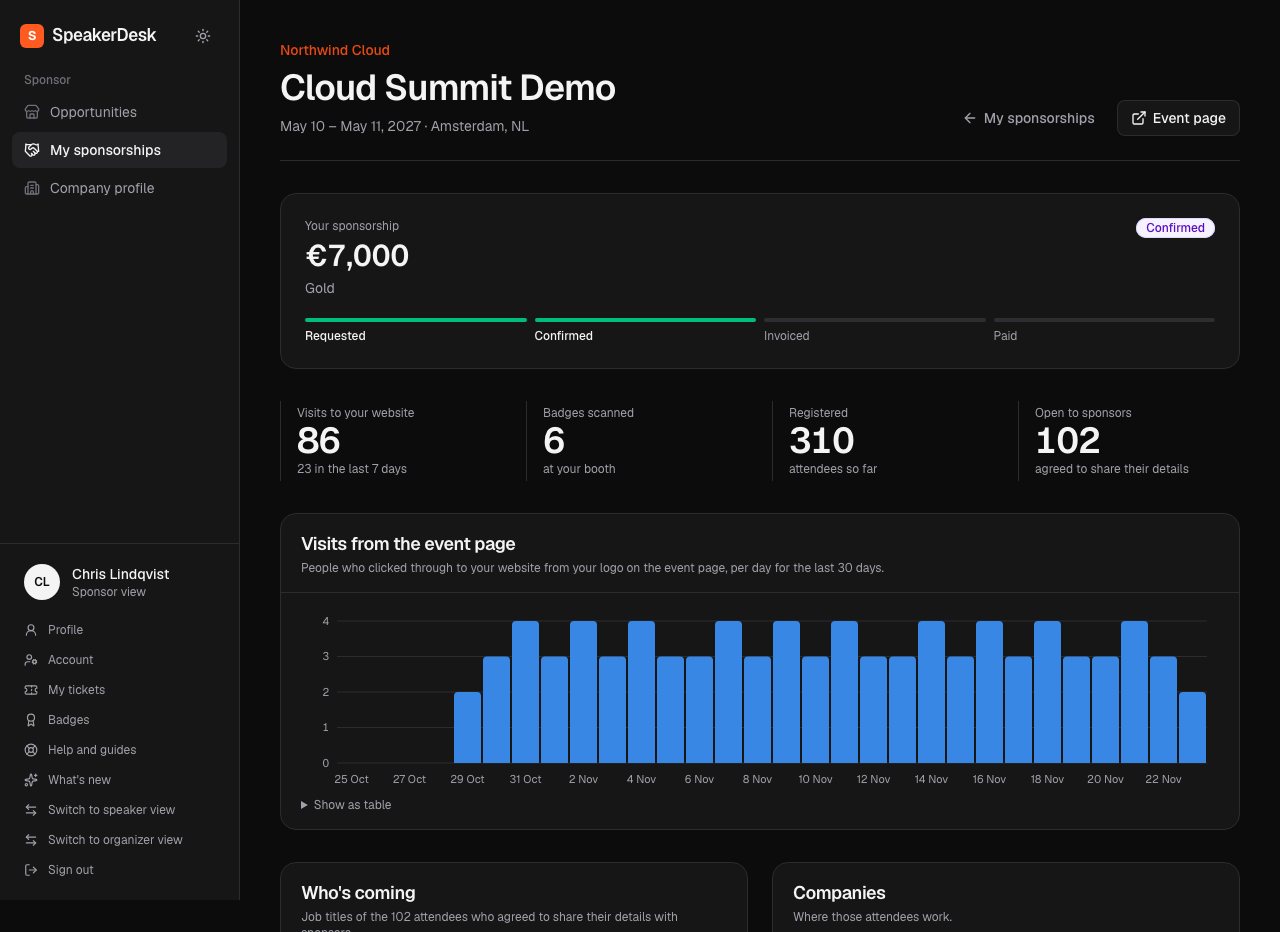
  • Browse prospectuses, pick a package (or your own amount) and follow the deal from request to paid.
  • A dashboard per event: visits to your website from the event page, badges scanned at your booth, and who's coming.
  • Only attendees who agreed to hear from sponsors are ever shared with you.
A sponsor's dashboard for one event

Attendees

A ticket that does more, no account needed

  • A QR code for the door, in their ticket email and on their phone.
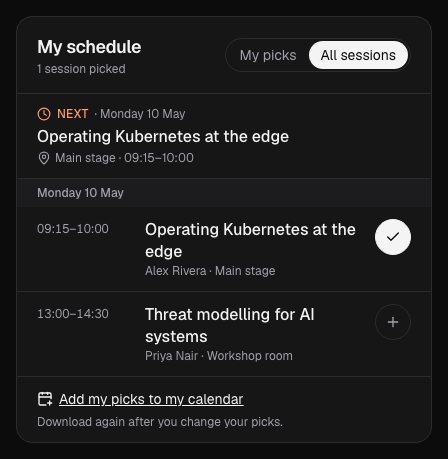
  • Pick sessions on the ticket page to get their own schedule: what's on now and next, overlaps, and a calendar file.
  • Follow the organizer's community to hear about the next event.
An attendee's own schedule on their ticket page

Communities

An audience that comes back

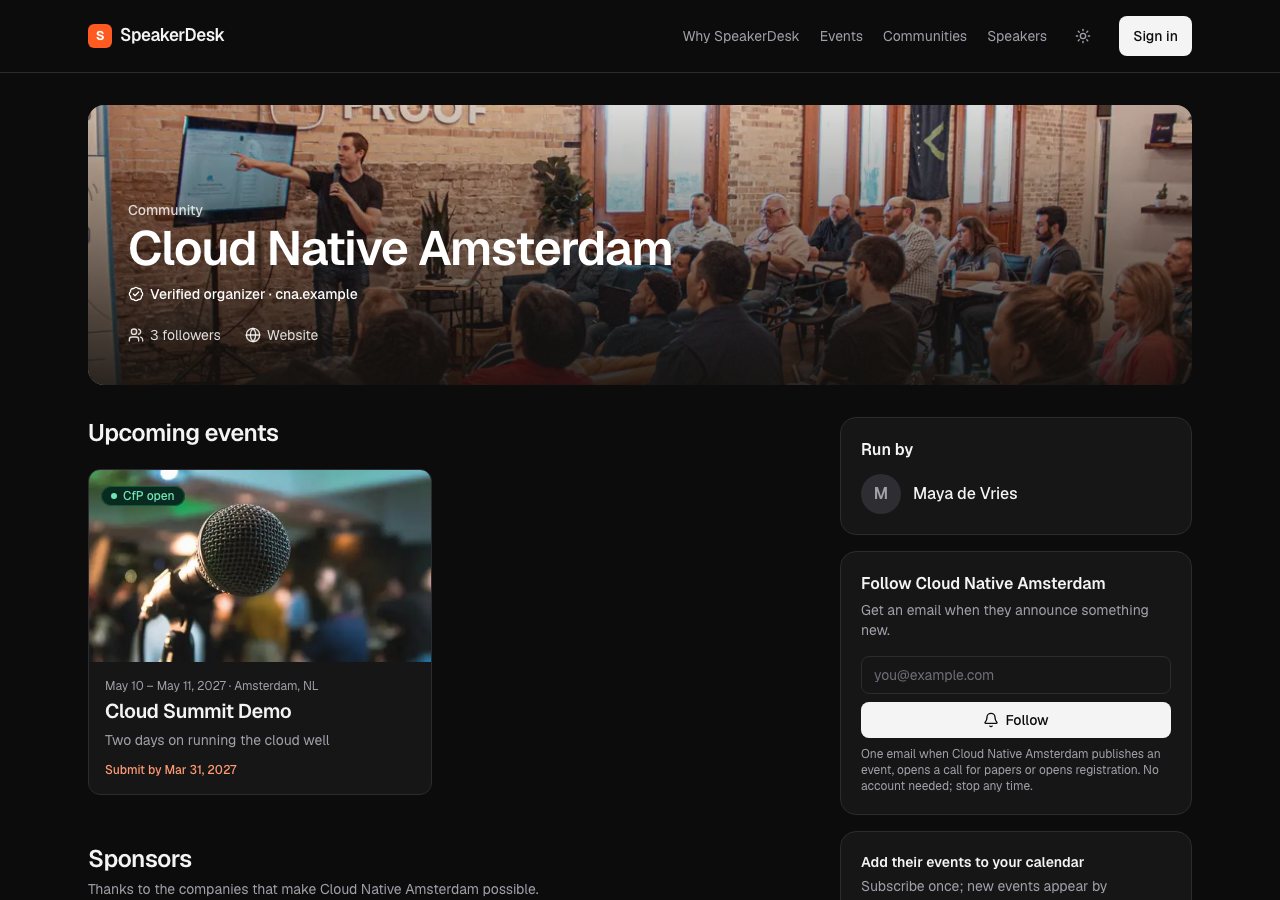
  • A page for your meetup or series with every event, and followers who get one email per new event, call for papers or registration.
  • Start the next edition from the last one: same venue, team, tickets and packages.
  • A calendar feed people subscribe to once.
A community page with its events and a follow form

Built for security events

Trust is part of the product

Security conferences attract people who test what they use. SpeakerDesk is built so attendees, speakers and sponsors can tell who they deal with.

Verified organizers
A code to the organization's own domain and a review by a SpeakerDesk admin. The badge names the domain, so nobody can pass off a fake event in a real organization's name.
Verified sponsors
Companies confirm their domain before they can request a package, and organizers see who is asking. Requests never block a package.
QR codes that can't be misused
Badge codes only tell the door team and sponsors' scanners who someone is. The link that can cancel a ticket never goes into a QR code.
Personal data stays personal
Attendee details are encrypted per event and deleted 30 days after it. Organizers see how many people follow them, never who. Sponsors only see attendees who agreed.

Privacy

Your data isn't the product. We don't sell it, and we don't keep it.

An event needs your name and email for a few weeks, not forever. SpeakerDesk keeps attendee details only as long as the event needs them, hosted in the EU, and lets you leave whenever you want.

We never sell your data
No ads, no tracking cookies, no data brokers, no selling lists to sponsors. SpeakerDesk doesn't earn anything from who you are.
Deleted 30 days after the event
Names, email addresses, companies and job titles of attendees go 30 days after the event, automatically. The organizers get a week's notice; the numbers stay.
Encrypted with a key per event
Attendee details are stored encrypted, with a key only the app can unlock. A copy of the database alone shows nothing readable, and backups roll off within 14 days.
We keep the least we can
Emails we send aren't kept after delivery, the security log never holds email addresses, and an attendee doesn't need an account.

You can always opt out

  • Register for an event without creating an account.
  • Sponsors only get your details if you tick the box, and you can stop sharing any time from your ticket.
  • Delete your details from an event yourself, from your ticket page, whenever you want.
  • Stop following a community with one click in any email.
  • Download everything and delete your account any time; it's gone at once.

Read the privacy notice

Keep what works

Start without moving everything

Your members RSVP somewhere else? Keep it. Point the event page's registration button there, and run the call for papers, programme and sponsors on SpeakerDesk.

  • Link registration to the site your members already use.
  • Import attendee lists from other platforms or a spreadsheet.
  • Speakers bring their profile and sessions from other call for papers services in a minute.
  • Export everything, and connect your own tools with the API.

See it with a real event

Look around a made-up conference as organizer, speaker and sponsor. No account needed, nothing to install.

Create a free account

See everything that's new